Extending AD CS Privilege Escalation to the Cloud

Phu Tran
Mar 5, 2026
Certificate Lifecycle Management platforms introduce a new authorisation layer between users and Active Directory Certificate Services. When that layer is misconfigured, it can become a path to Domain Admin that bypasses every ADCS permission you thought was protecting you.
Responsible disclosure. This research was shared proactively with the AppViewX security team and is an educational resource for security teams and system administrators, intended to help organisations assess and harden their own PKI configurations. AppViewX Cert+ is a capable and widely-deployed platform; the findings here reflect configuration risks rather than product defects.
The AD CS attack class has had a remarkable trajectory. SpecterOps documented the foundational ESC techniques in their 2021 whitepaper "Certified Pre-Owned," giving defenders and attackers alike a structured taxonomy for certificate-based privilege escalation. Dirk-jan Mollema later showed that the same principles could be extended to cloud-managed endpoints through Microsoft Intune, demonstrating that introducing a middleware layer between a user and a Certificate Authority relocates the attack surface rather than eliminating it.
This post extends that body of work into AppViewX Cert+, a Certificate Lifecycle Management (CLM) platform deployed at scale across a significant portion of the Fortune 500. The core finding is consistent with the Intune research: when a cloud or SaaS platform acts as an intermediary for AD CS enrolment, the platform's own access controls become the effective permission boundary. If those controls are misconfigured, the underlying AD CS enrolment rights become largely irrelevant.
The intent here is to help infrastructure and security teams understand the risk, identify it in their own environments, and configure their deployments with the right guardrails in place.
What is AppViewX Cert+?
AppViewX Cert+ is a CLM platform that centralises the enrollment, renewal, and revocation of digital certificates across multiple Certificate Authorities from a single interface. It supports Microsoft AD CS alongside external CAs, and it operates as an abstraction layer: the platform handles the enrollment workflow, while connectivity back to the underlying CA infrastructure is managed through a connector model.
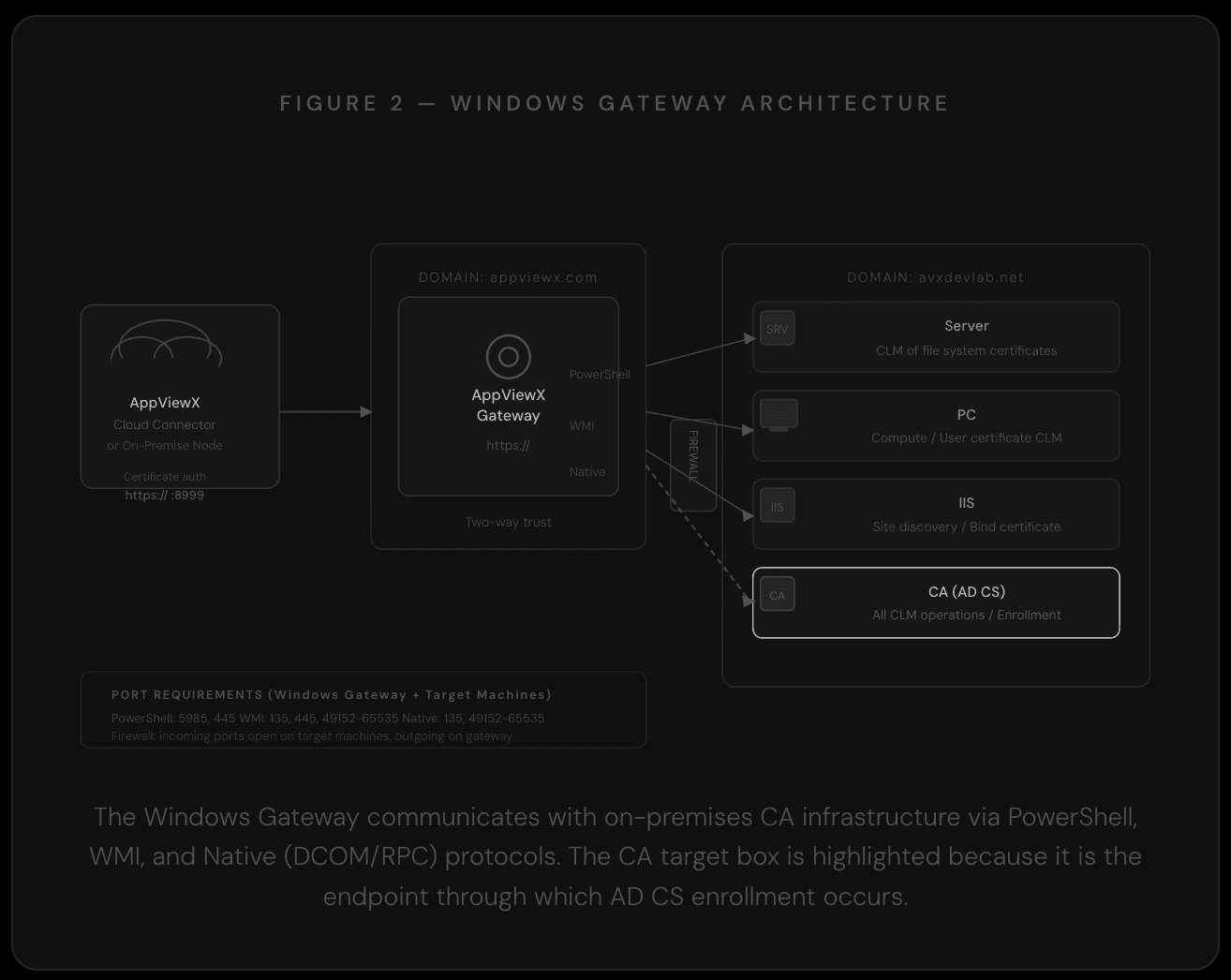
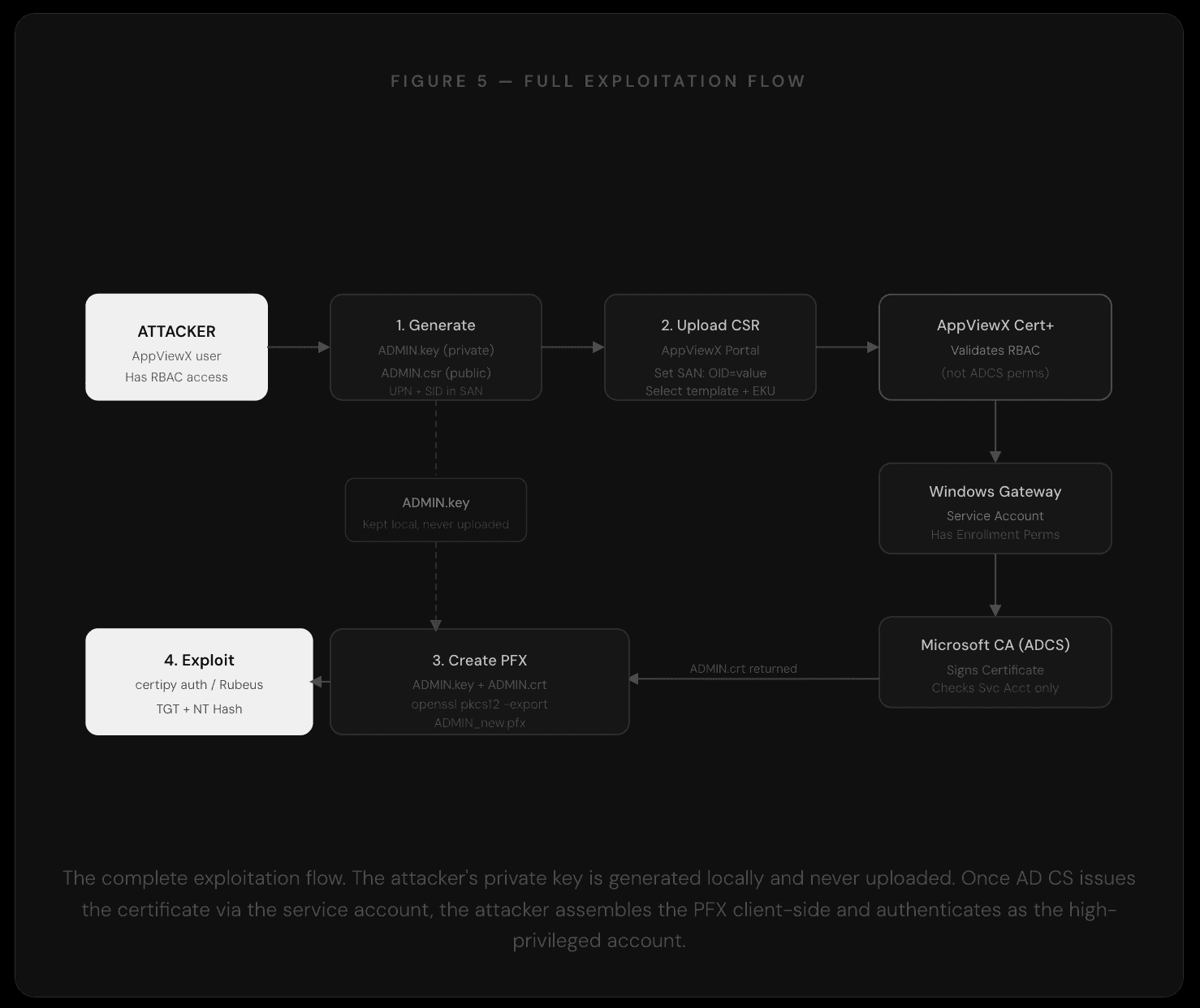
In a typical deployment, a Cloud Connector sits inside the corporate network and communicates outbound over TLS to the Cert+ SaaS platform. Inbound certificate requests are routed from the Cloud Connector to a Windows Gateway service running on a domain-joined host. The Windows Gateway communicates with the Microsoft CA via DCOM/RPC, submitting enrollment requests using a service account. That service account requires high AD privileges, typically Enterprise Admin or Domain Admin level, to perform enrolment operations on behalf of portal users.
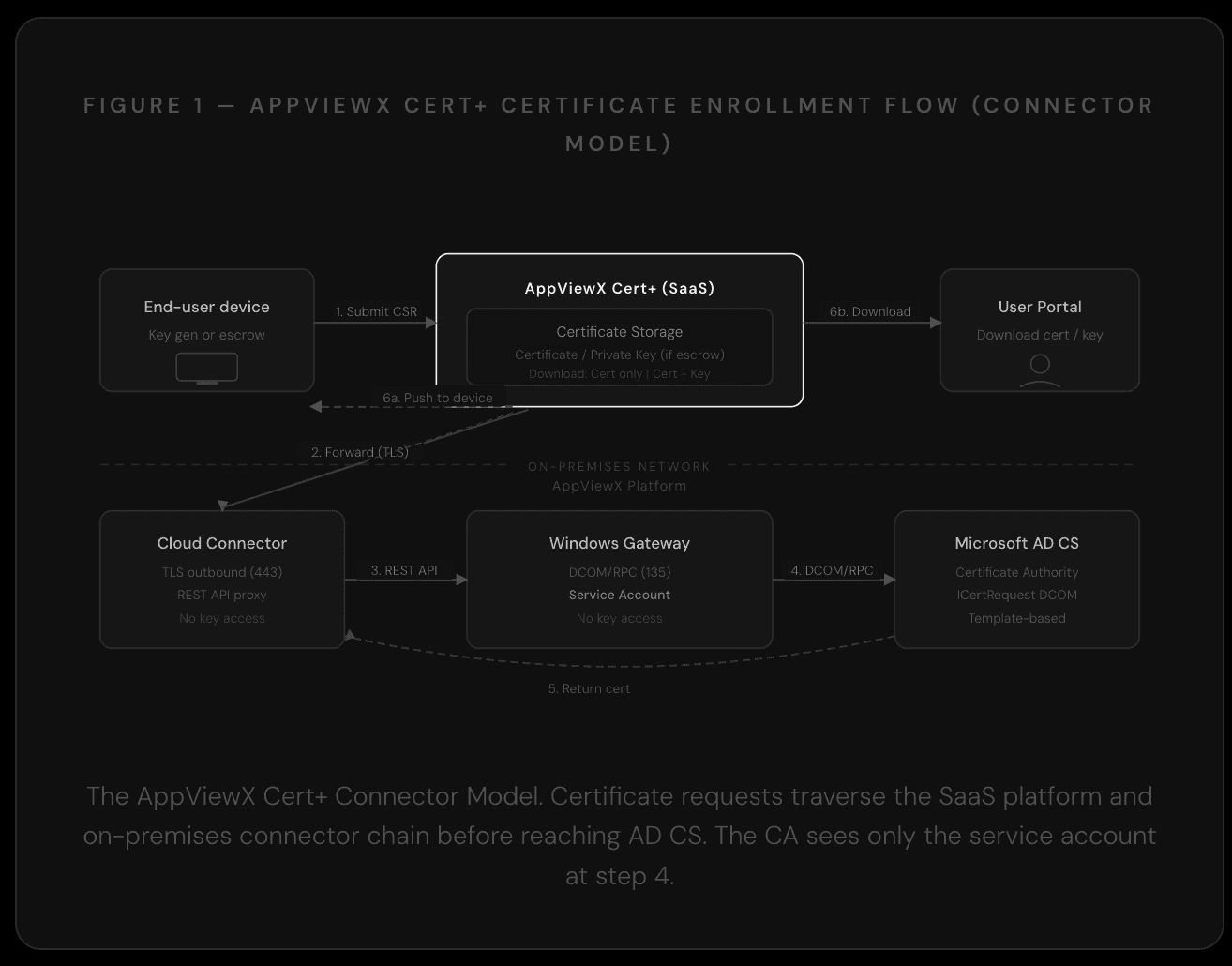
The Windows Gateway service account carries Enterprise Admin or Domain Admin enrollment rights. AD CS evaluates that account, not the individual portal user who initiated the request.
The platform supports several enrollment protocols: SCEP, EST (RFC 7030), ACME, and native Windows auto-enrollment via Group Policy (WAEP). This research focuses on the flow where private key generation remains on the client side, specifically the Upload CSR enrollment mode.
Where the Authorisation Boundary Shifts
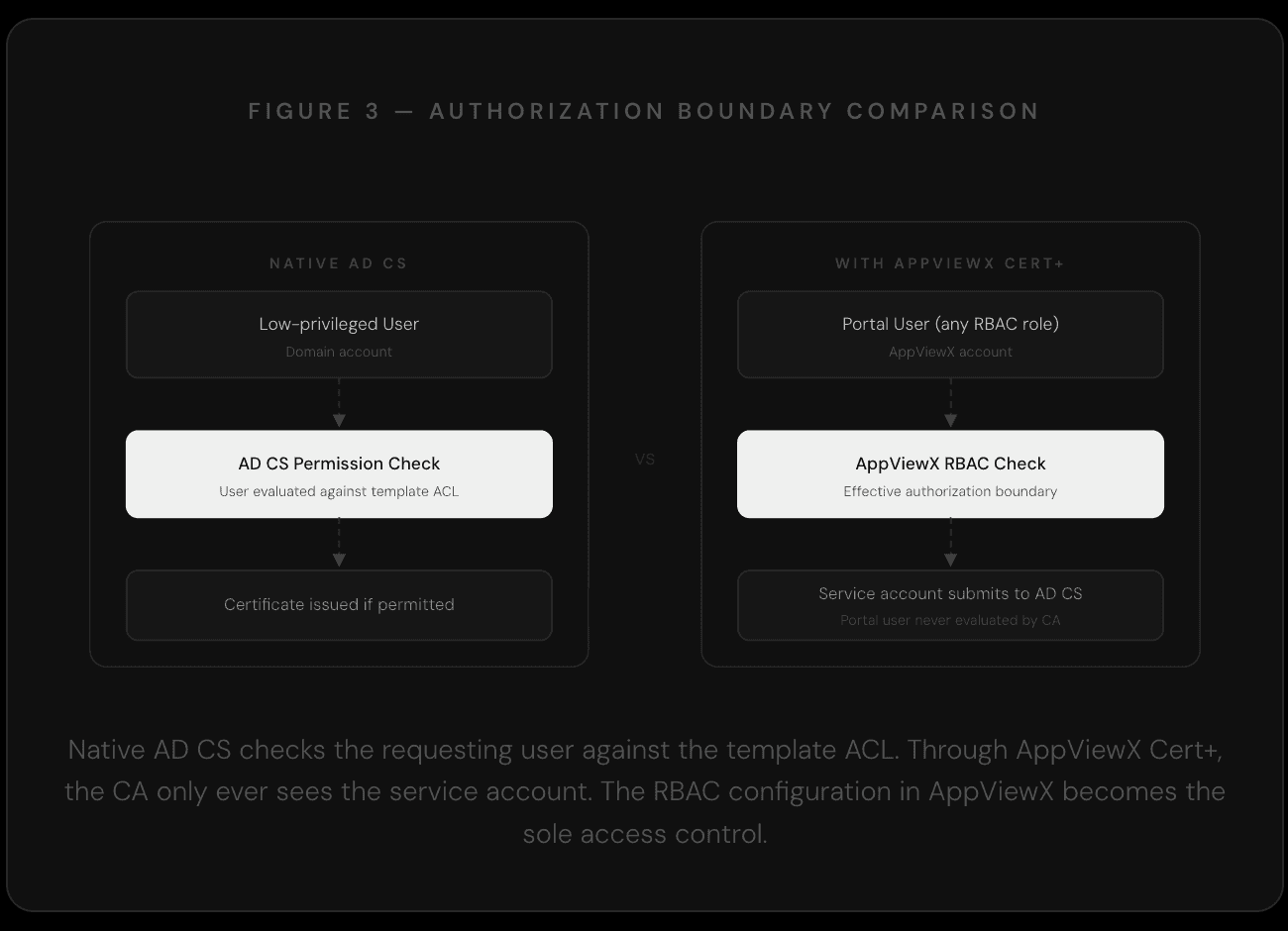
In a standard AD CS deployment, certificate template enrollment rights are enforced at the CA level. An attacker who compromises a low-privileged account will be denied enrollment on sensitive templates because the CA checks that account's permissions directly.
When AppViewX Cert+ mediates that request, Active Directory Certificate Services checks the service account's permissions, not the portal user's. AppViewX RBAC becomes the effective enrollment gate.
The Windows Gateway service account, by design, carries the enrollment rights needed to request certificates across the templates configured in Cert+. AD CS evaluates that service account and approves the request. The question of whether the individual portal user should be able to request that certificate is a question AppViewX RBAC must answer, given that AD CS never sees the end user at all.
In a well-configured deployment, AppViewX RBAC enforces fine-grained controls over which users can request which certificate types. In a loosely configured one, or a default installation where RBAC has not been hardened, any portal user can effectively exercise the enrollment rights of the service account against every template that account can access.
Issuing AD CS Certificates with Arbitrary Subjects
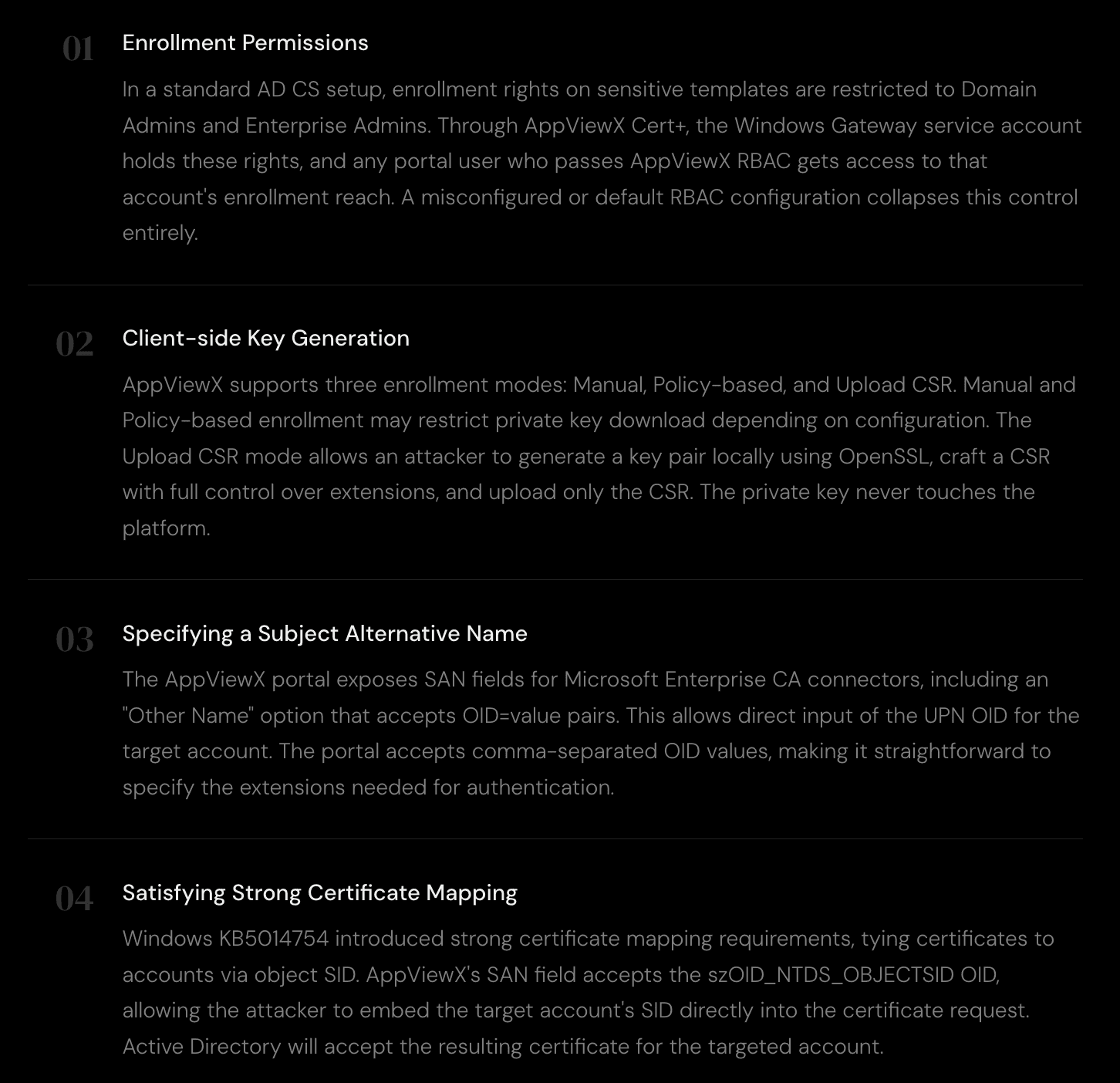
To obtain a certificate that authenticates as a high-privileged account through AD CS, five conditions must hold. The following walks through each one and shows how AppViewX Cert+ affects it.
Step-by-Step
Step 1 - Crafting the CSR
The attacker creates an OpenSSL configuration file that defines the target subject and embeds both the UPN and SID into the Subject Alternative Name extensions. The UPN field uses szOID_NT_PRINCIPAL_NAME (OID 1.3.6.1.4.1.311.20.2.3) and the SID field uses szOID_NTDS_OBJECTSID (OID 1.3.6.1.4.1.311.25.2.1).
ADMIN.cnf
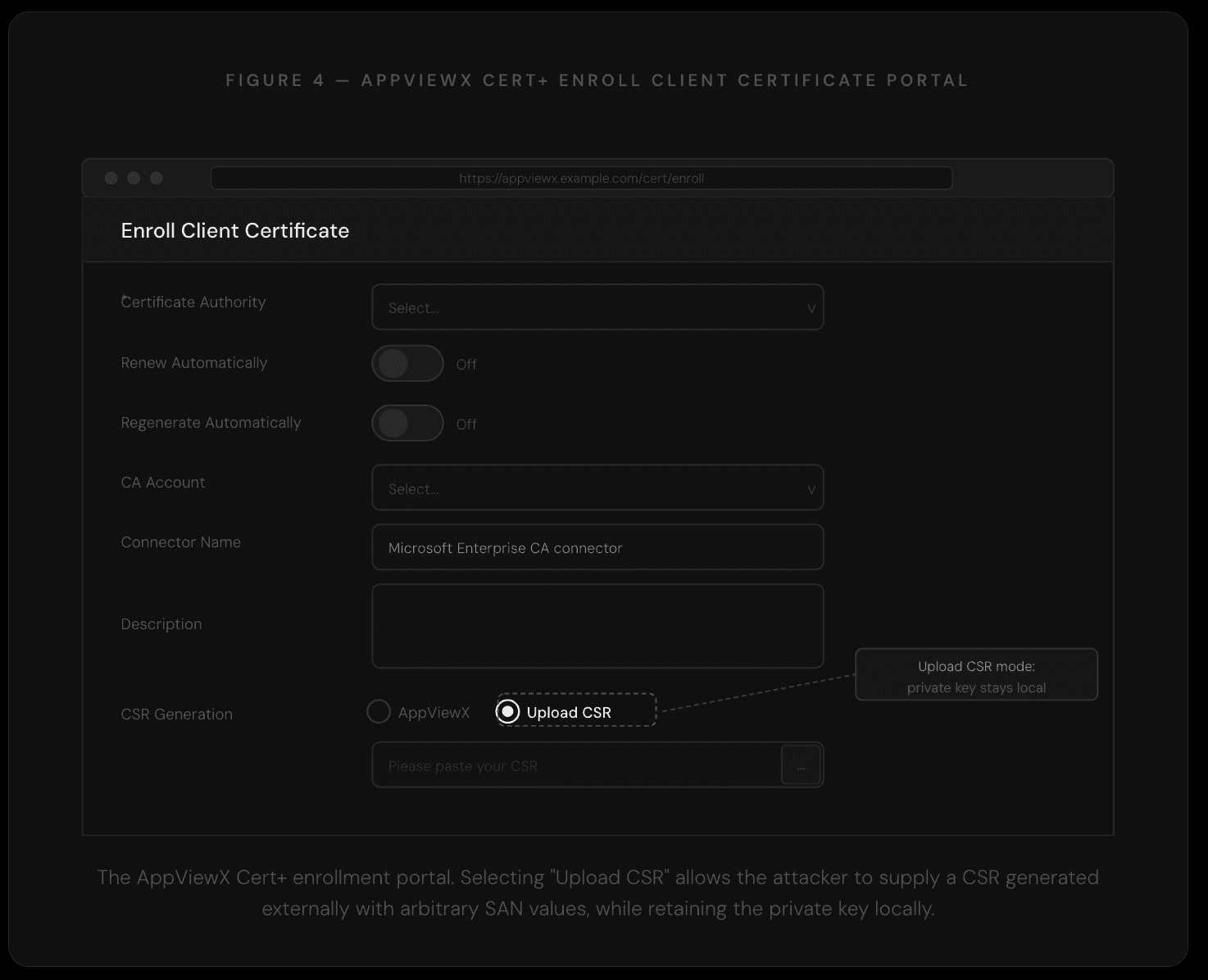
From this configuration, OpenSSL generates a private key and a CSR. The private key stays on the attacker's machine throughout the entire process.
Generate key and CSR
Step 2 - Uploading to AppViewX and Set SANs
The raw CSR is uploaded to the AppViewX Cert+ portal using the "Upload CSR" option in the enrollment flow. In the SAN configuration fields, the attacker specifies the OID pairs directly, providing both the UPN and the object SID for the target account.
SAN field input
Step 3 - Assembling the PFX
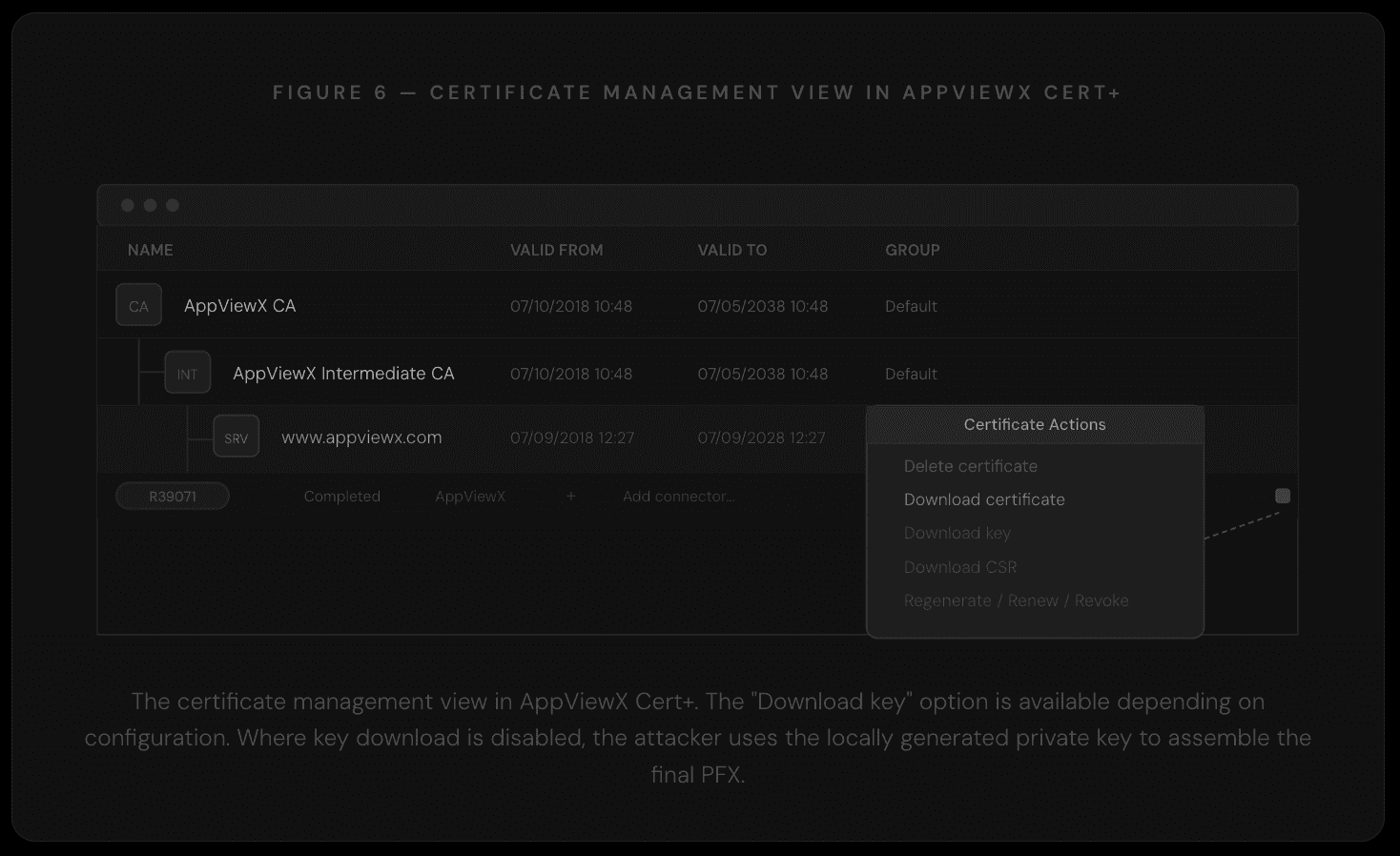
Once the certificate is issued and the .crt file is downloaded from the portal, the attacker combines it with the locally retained private key to produce a fully valid PFX. At no point was the private key shared with AppViewX or with AD CS.
Create PFX from local key and issued certificate
The resulting PFX authenticates as the target high-privileged account. Standard tooling such as Certipy or Rubeus can then be used to request a TGT or retrieve the NT hash.
Why This Matters
The architecture of AppViewX Cert+ is sensible: centralising PKI management behind a unified portal reduces operational complexity and provides certificate lifecycle visibility across environments that would otherwise be fragmented. The issue is that this architectural decision has a security corollary that many deployments have not accounted for: the portal's access controls now carry the weight of the CA's enrollment controls.
Several factors make this worth particular attention. The platform is deployed across a significant number of large enterprises, meaning the number of environments where this configuration risk could exist is substantial. The attack requires no vulnerability in AppViewX's code; it is a function of how the system is designed and how administrators configure RBAC. Because the CA logs will show the service account rather than the portal user, attribution is non-trivial in environments without centralised AppViewX audit logging.
The pattern is also consistent with a broader theme in enterprise security: as infrastructure management shifts to abstraction layers and CLM platforms, the attack surface shifts with it. Defenders who have spent time hardening AD CS templates and enrollment rights need to account for any platform that mediates enrollment on behalf of users, and verify that those platforms enforce equivalent controls.
Recommendations
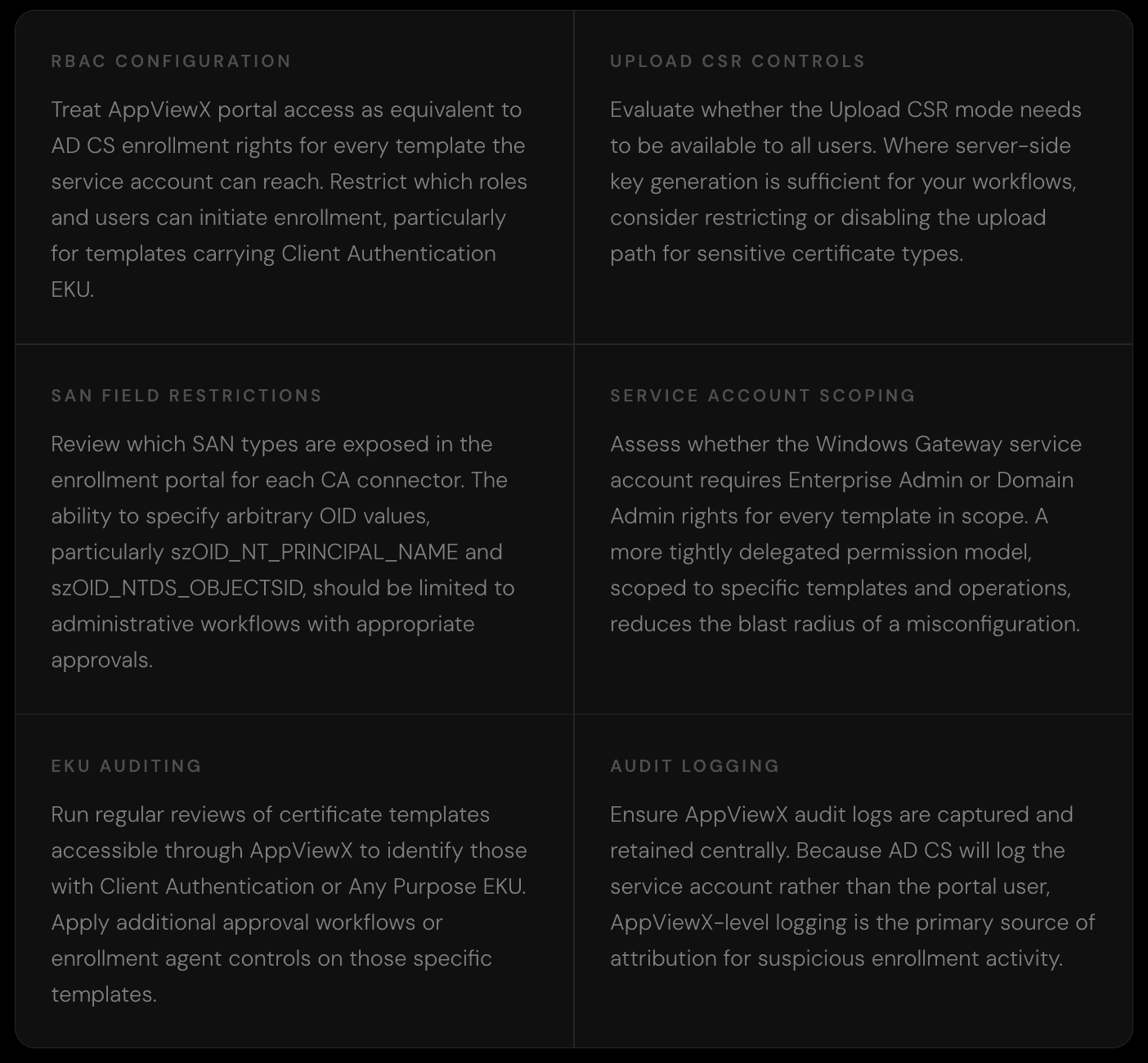
The following areas represent the most impactful configuration controls for organisations running AppViewX Cert+ against AD CS. They apply equally whether you are reviewing an existing deployment or setting one up from scratch.
The AD CS attack class continues to expand as new management platforms create new intermediary layers between users and Certificate Authorities. AppViewX Cert+ is a well-designed platform with genuine operational value, and like any powerful infrastructure tool, the security of its deployment depends on understanding exactly where the authorization boundaries sit and what happens when they are misconfigured.
If you are running AppViewX Cert+ in your environment, we hope this write-up gives you a clear lens for reviewing your configuration. If you are designing a CLM deployment, it provides a useful checklist for the access controls that matter most.